●VISUAL ONBOARDING & API SETUP

How to Setup InPlace AI

Follow this simple, step-by-step visual guide using real screenshots. You'll configure your free Groq API key and be polishing text in-place in under 2 minutes.

⏱ Time Required: ~2 minutes💰 Cost: 100% Free ($0)🔒 Security: AES-256-GCM Encrypted
01
PREREQUISITE

Install InPlace AI from Chrome Web Store

First, install the official InPlace AI extension directly from Google Chrome Web Store. It takes just one click and requires no complicated browser setup.

// ACTION CHECKLIST
  • ✓Click 'Add to Chrome' on the Chrome Web Store page.
  • ✓Pin the InPlace AI icon (in) to your Chrome toolbar for quick 1-click access.
  • ✓Works across LinkedIn, WhatsApp Web, Gmail, X/Twitter, Google Docs, and all web inputs.
💡
Pro TipOnce installed, click the puzzle icon in Chrome and click the Pin icon next to InPlace AI so it's always visible in your toolbar.
02
ACCOUNT CREATION

Create Your InPlace AI Account

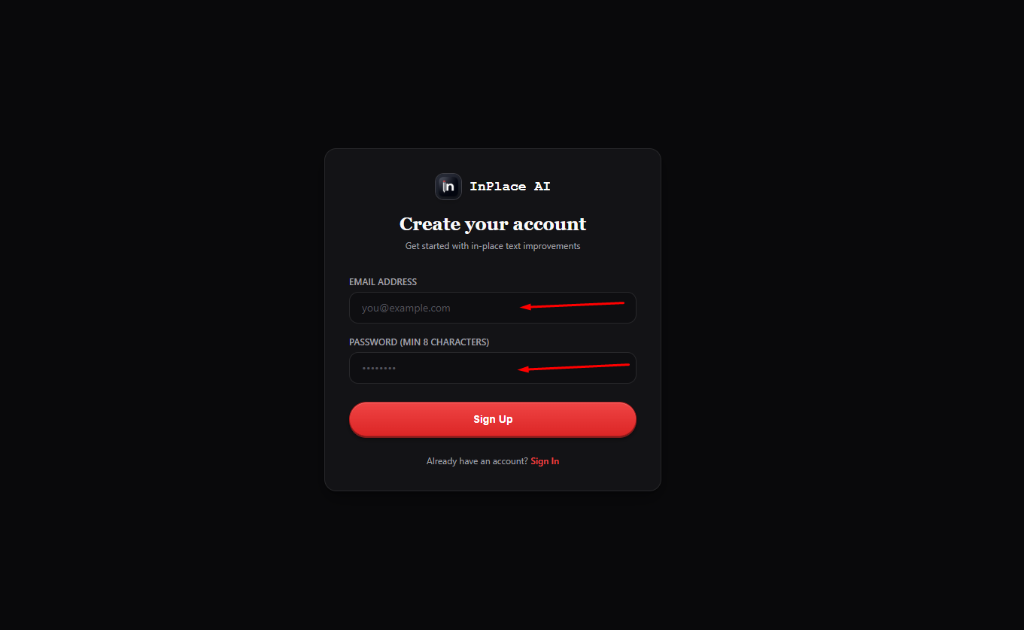
Navigate to the InPlace AI Sign Up page to create your user account. Your account links your browser extension with your encrypted key vault.

// ACTION CHECKLIST
  • ✓Enter your Email Address in the input field.
  • ✓Choose a secure Password (minimum 8 characters).
  • ✓Click the red 'Sign Up' button to finish registration.
🔒
Privacy & Encryption NoteYour password is never stored in plain text. It is securely salted and hashed with bcrypt before storage.
// SCREENSHOT WALKTHROUGHActual UI Reference
InPlace AI Sign Up Screen with Email and Password fields highlighted
03
CONTROL PANEL

Access Your InPlace AI Dashboard

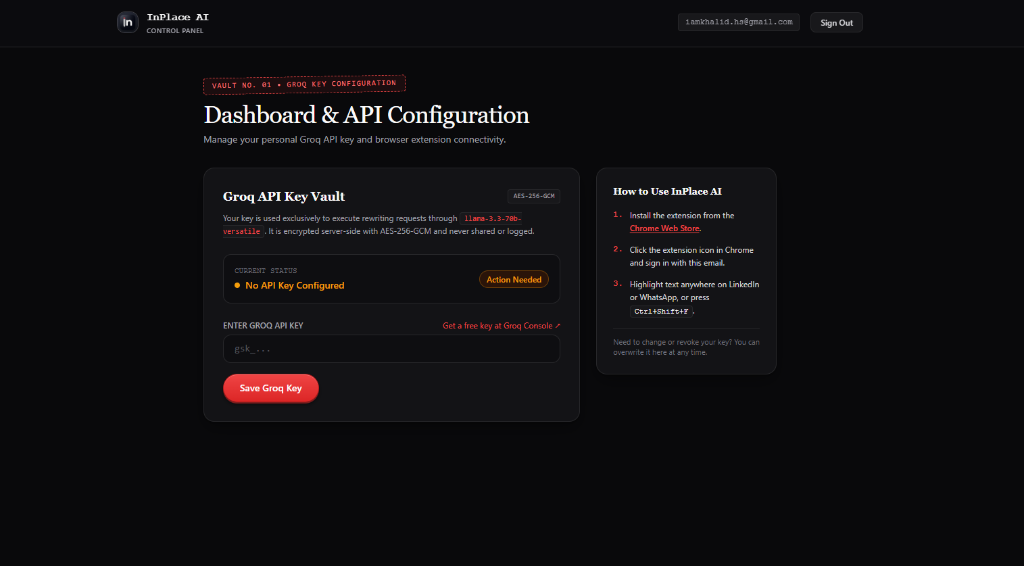
Upon signing up or logging in, you will be automatically routed to your Dashboard & API Configuration control panel.

// ACTION CHECKLIST
  • ✓The vault status initially reads 'No API Key Configured • Action Needed'.
  • ✓Notice the 'Get a free key at Groq Console ↗' link right above the input.
  • ✓Next, we will generate your 100% free Groq API key in under 60 seconds.
💡
Pro TipKeep this tab open while you grab your free key from Groq Console in the next step.
// SCREENSHOT WALKTHROUGHActual UI Reference
InPlace AI Dashboard showing No API Key Configured status and link to Groq Console
04
GROQ CLOUD

Sign in to Groq Console (100% Free)

Groq provides developers with 1,000 free AI requests every single day on Meta's ultra-fast Llama 3.3 model. No credit card is required.

// ACTION CHECKLIST
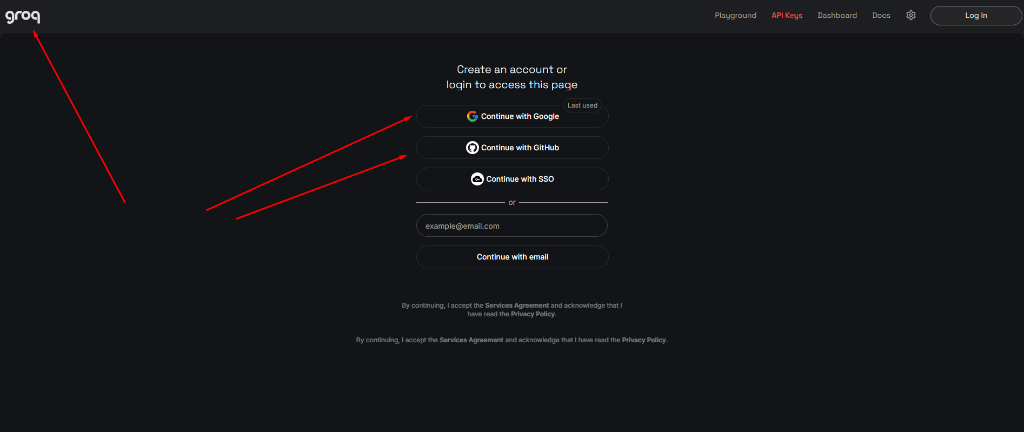
  • ✓Head to console.groq.com.
  • ✓Sign in easily using 'Continue with Google', 'Continue with GitHub', or 'Continue with email'.
  • ✓No payment information or billing setup is asked.
💡
Pro TipWhy Groq? Groq's LPU hardware generates high-quality text in under 400ms — 10x faster than standard AI chatbots.
// SCREENSHOT WALKTHROUGHActual UI Reference
Groq Console Login Page showing Continue with Google and GitHub options
05
API KEYS

Create a New API Key in Groq

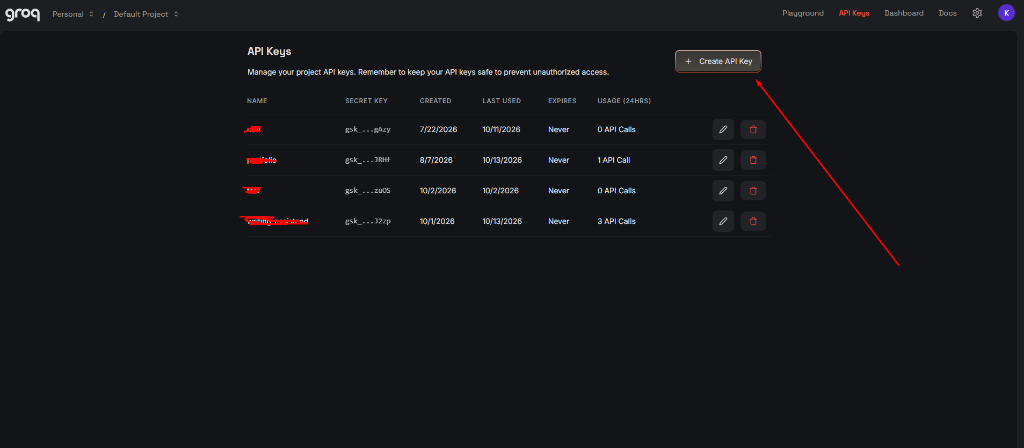
Once inside Groq Console, open the API Keys tab from the top navigation bar to create a dedicated key for InPlace AI.

// ACTION CHECKLIST
  • ✓Click 'API Keys' in the top header menu (or navigate to console.groq.com/keys).
  • ✓Click the prominent '+ Create API Key' button in the top right corner.
// SCREENSHOT WALKTHROUGHActual UI Reference
Groq Console API Keys management page with Create API Key button highlighted
06
KEY CONFIGURATION

Name Your Key & Submit

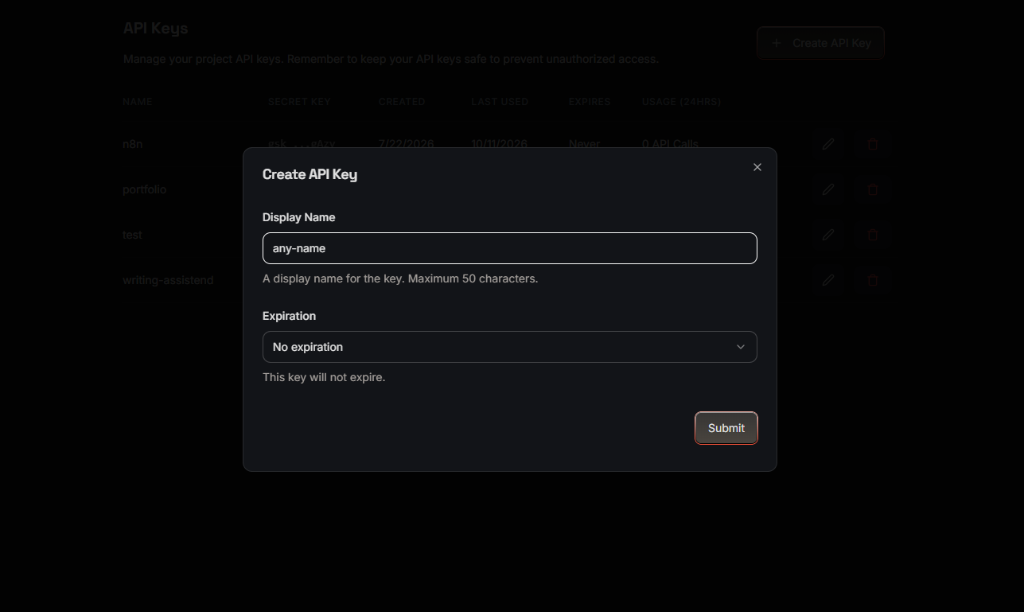
In the popup dialog, give your new API key an identifiable name and set expiration.

// ACTION CHECKLIST
  • ✓Enter a display name like 'inplace-ai', 'writing-assistant', or 'any-name'.
  • ✓Set Expiration to 'No expiration' so your writing flow is never unexpectedly interrupted.
  • ✓Click the 'Submit' button to generate your secret key.
// SCREENSHOT WALKTHROUGHActual UI Reference
Groq Create API Key modal with Display Name input and Submit button
07
CRUCIAL STEP

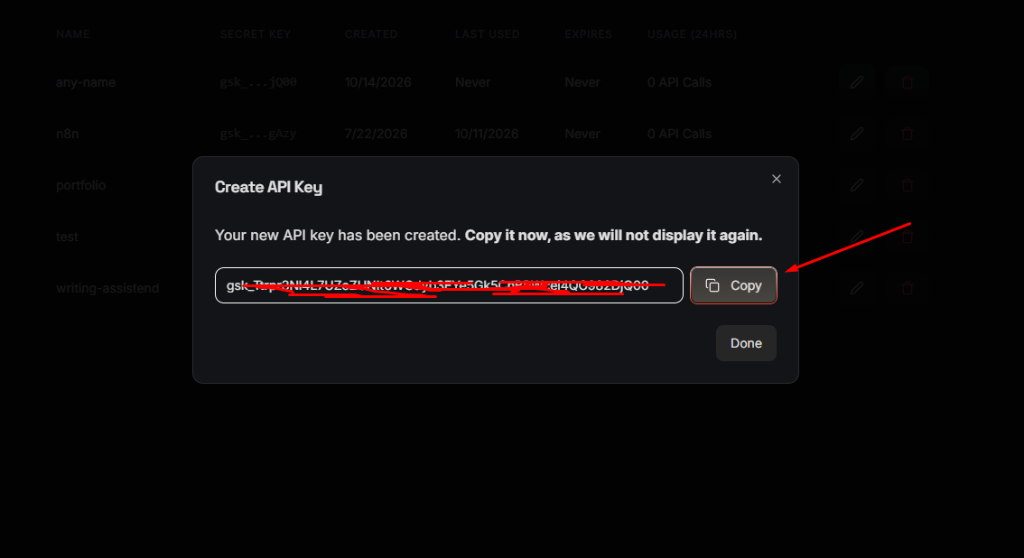
Copy Your Secret API Key

Groq will display your newly created secret key (starting with 'gsk_...').

// ACTION CHECKLIST
  • ✓Click the 'Copy' button right next to your key.
  • ✓Important: Groq will never display this key again after you close this dialog.
  • ✓Store it or immediately paste it into your InPlace AI Dashboard in the next step.
⚠️
Important Attention RequiredBe sure to click 'Copy' before pressing 'Done'. If you accidentally close it, you can simply create a new key anytime.
// SCREENSHOT WALKTHROUGHActual UI Reference
Groq modal showing generated secret key with red arrow pointing to Copy button
08
VAULT ENCRYPTION

Paste & Save in InPlace AI Dashboard

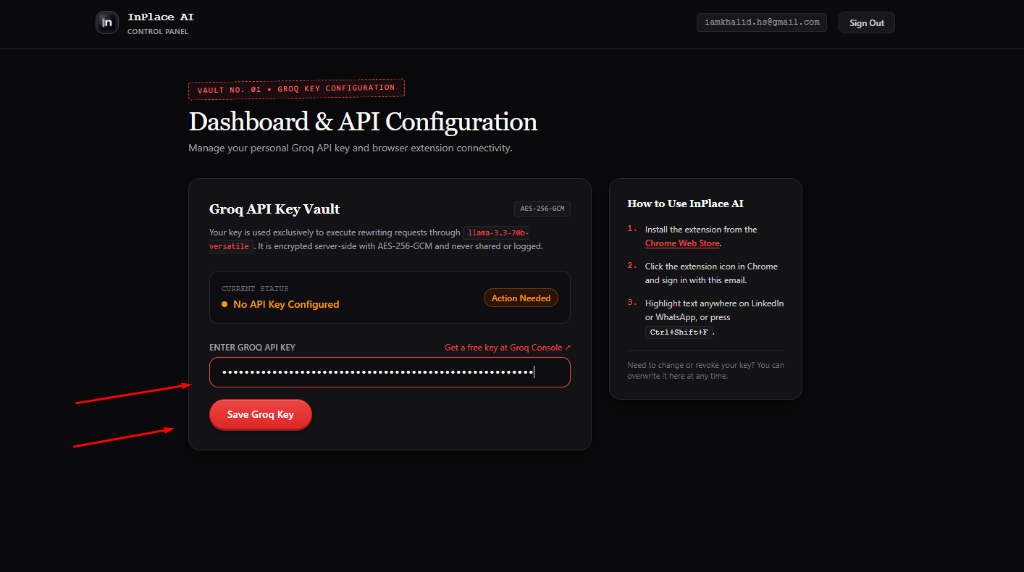
Return to your InPlace AI Dashboard tab to save your new Groq key into your encrypted vault.

// ACTION CHECKLIST
  • ✓Paste your copied key (gsk_...) into the 'ENTER GROQ API KEY' text field.
  • ✓Click the red 'Save Groq Key' button.
  • ✓The server verifies the key directly with Groq and encrypts it using AES-256-GCM before saving.
🔒
Privacy & Encryption NoteZero-Knowledge Encryption: Your key is encrypted with AES-256-GCM authenticated encryption and stored in an isolated vault.
// SCREENSHOT WALKTHROUGHActual UI Reference
Dashboard with pasted Groq key pointing to the Save Groq Key button
09
SUCCESS

Key Encrypted & Quota Meter Active!

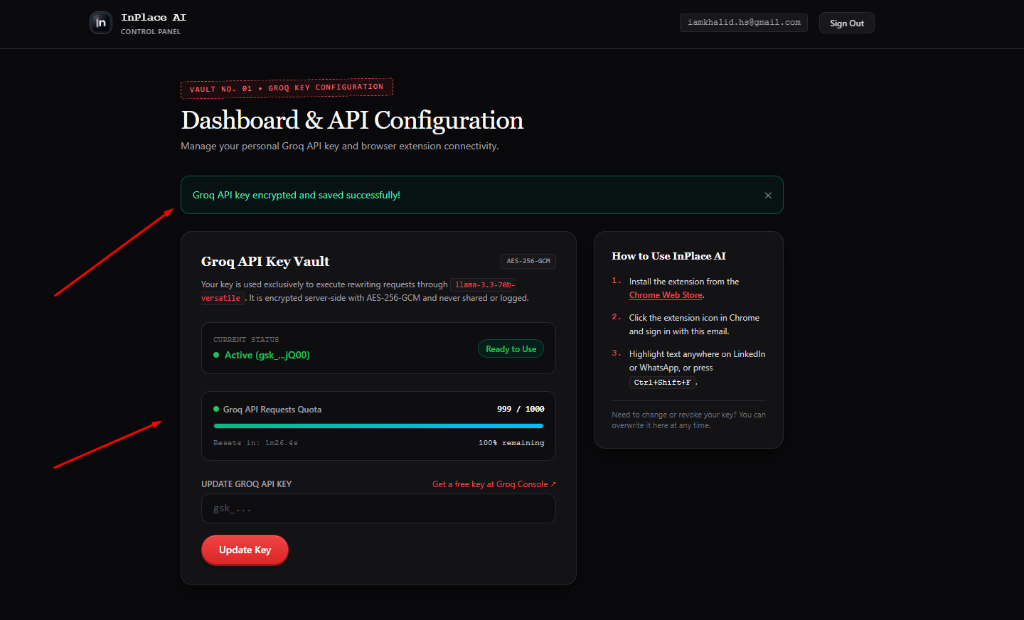
Your key is now live and fully connected! You will see an immediate confirmation banner.

// ACTION CHECKLIST
  • ✓Green banner appears: 'Groq API key encrypted and saved successfully!'.
  • ✓Status badge turns green: 'Active (gsk_...jQ00) • Ready to Use'.
  • ✓Live quota tracker displays: '999 / 1000 requests remaining' with automated reset countdown.
💡
Pro TipYou can overwrite or rotate your key anytime from this same dashboard screen.
// SCREENSHOT WALKTHROUGHActual UI Reference
Dashboard showing green success notification, active key status, and quota bar
10
EXTENSION LOGIN

Sign in to the Chrome Extension

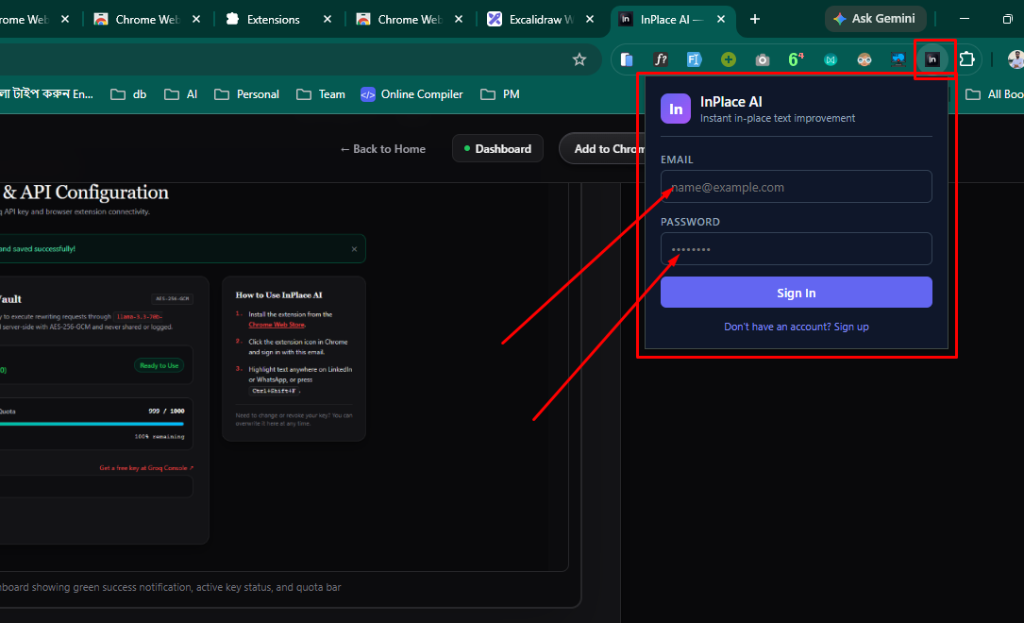
Open the InPlace AI extension popup in Chrome and log in with your account credentials. This links the extension to your encrypted API key vault.

// ACTION CHECKLIST
  • ✓Click the pinned InPlace AI (in) icon in your Chrome extensions bar (highlighted by the red square).
  • ✓Enter your registered EMAIL address (e.g. name@example.com).
  • ✓Enter your account PASSWORD (minimum 8 characters).
  • ✓Click the purple/blue 'Sign In' button.
  • ✓Once signed in, the extension automatically connects to your personal Groq API key vault for rapid in-place rewrites.
🔒
Privacy & Encryption NoteYour session token is securely kept in Chrome's isolated extension storage. The extension never exposes or transmits your raw password.
// SCREENSHOT WALKTHROUGHActual UI Reference
InPlace AI Chrome Extension popup login window with Email, Password, and Sign In button
11
DEMO & HOW TO USE

How to Use: Watch Video & Rewriting Guide

Watch the demonstration video below and follow the quick instructions to start polishing your writing seamlessly anywhere on the web.

// ACTION CHECKLIST
  • ✓Zero tab switching: polish text directly inside WhatsApp, LinkedIn, Gmail, Twitter/X, and web fields.
  • ✓Multiple tone modes: Fix Grammar, Executive/Professional, Friendly, or Short & Concise.
  • ✓1-Click instant undo: revert back to your exact original draft at any time.
  • ✓Ultra-fast processing: powered by your personal Groq Llama 3.3 key in under 400 milliseconds.
💡
Pro TipTry it out right now! Open WhatsApp Web or LinkedIn, type a quick rough sentence, and press Ctrl+Shift+F.
// DEMO VIDEO WALKTHROUGHLive Screen Capture
INPLACE AI • TUTORIAL & DEMO VIDEO
// HOW TO USE MODES & SHORTCUTS

Method A: Highlight Text & Use Floating Toolbar

Select any draft sentence in an email, chat, or social post. A compact floating bar appears immediately above your selection.

  • ›Click 'Fix Grammar' to cleanly remove spelling, grammar, and punctuation mistakes without changing your personal voice.
  • ›Click 'Professional' to make informal wording sound polished, confident, and business-ready.
  • ›Click 'Friendly' to soften tone and add warmth for team chats and customer replies.
  • ›Click 'Concise' to cut out filler words, rambling sentences, and clutter.

Method B: Global Keyboard Shortcut (Ctrl+Shift+F)

Fastest for long emails and messages. You don't even have to highlight text.

  • ›On Windows / Linux: Press Ctrl+Shift+F inside any active input or textarea.
  • ›On macOS: Press Cmd+Shift+F.
  • ›InPlace AI automatically polishes the entire field contents at once.

Method C: 1-Click Instant Undo

Your original draft is never lost.

  • ›Every time a rewrite completes, a floating 'Undo' pill appears.
  • ›Click 'Undo' anytime to immediately restore your exact original words.
  • ›You can also press Ctrl+Z / Cmd+Z inside the input as standard browser undo.

Method D: Google Docs & Canvas Editors Fallback

Google Docs uses custom canvas rendering that restricts direct webpage DOM manipulation.

  • ›When you format text in Google Docs, InPlace AI automatically shows an 'Instant Copy' helper.
  • ›Simply click 'Copy' and press Ctrl+V / Cmd+V to paste your refined draft.
COMMON QUESTIONS

Setup & Groq Key FAQs

Is Groq really 100% free with no credit card?

Yes! Groq gives every developer account 1,000 free requests per day. You do not need to enter a credit card, PayPal, or payment details.

Where is my Groq API key stored?

Your key is encrypted server-side using AES-256-GCM authenticated encryption. It is decrypted in volatile memory only for the millisecond needed to call Groq, and is never logged or sold.

What shortcut triggers the rewrite?

Press Ctrl+Shift+F (or Cmd+Shift+F on Mac). You can also click the floating InPlace AI icon next to your text cursor.

Can I change or revoke my key later?

Yes! Simply return to your Dashboard at any time, paste a new key into the vault, and click Save to overwrite it instantly.